Email client in the browser
All your email addresses in one inbox, in the browser.
Faldro is for freelancers, agencies and companies that manage many addresses across several domains — with multiple sending identities per mailbox and controlled team access.
In January 2027 Google removes “Send as” in Gmail for addresses not hosted at Google, ends Gmailify and stops fetching mail from third-party accounts over POP. Google's announcement
02 — The change
What Google removes in January 2027
Three features go away. Only Gmail's connection to addresses that are not hosted at Google is affected.
What stays the same
- Access to Gmail itself over IMAP or POP from external clients is unaffected.
- “Send as” between Google-hosted addresses — Gmail and Google Workspace — remains.
- Forwarding from your provider to Gmail is set up at the provider; the change does not affect it.
03 — Self-check
Are you affected?
Four statements about your setup. If one of them applies, part of your current workflow ends in January 2027.
04 — Alternatives
The four options compared
Google names the provider's own webmail, a desktop client and the Gmail app as alternatives. For some requirements those are the better choice.
| Requirement | Provider's webmail | Desktop client | Gmail app (mobile) | Faldro |
|---|---|---|---|---|
| In the browser, no installation | Yes | No, installed per device | On the phone only | Yes |
| Multiple sending identities per mailbox | Varies by provider, usually only its own address | Yes | From 2027, Google addresses only | Yes, any number |
| All accounts in one inbox | No, a separate login per provider | Yes | Google accounts only | Yes |
| Several people accessing one mailbox | Only via a shared password | Only via a shared password | No | Yes, permission levels per person |
| Working offline | No | Fully, all messages stored locally | Partly | No, requires a connection |
| Additional cost | None, included in the plan | None, the software is free | None | Paid per mailbox, users at no extra cost |
| Setup effort | None | Per device and per account | None | Once per mailbox |
05 — Features
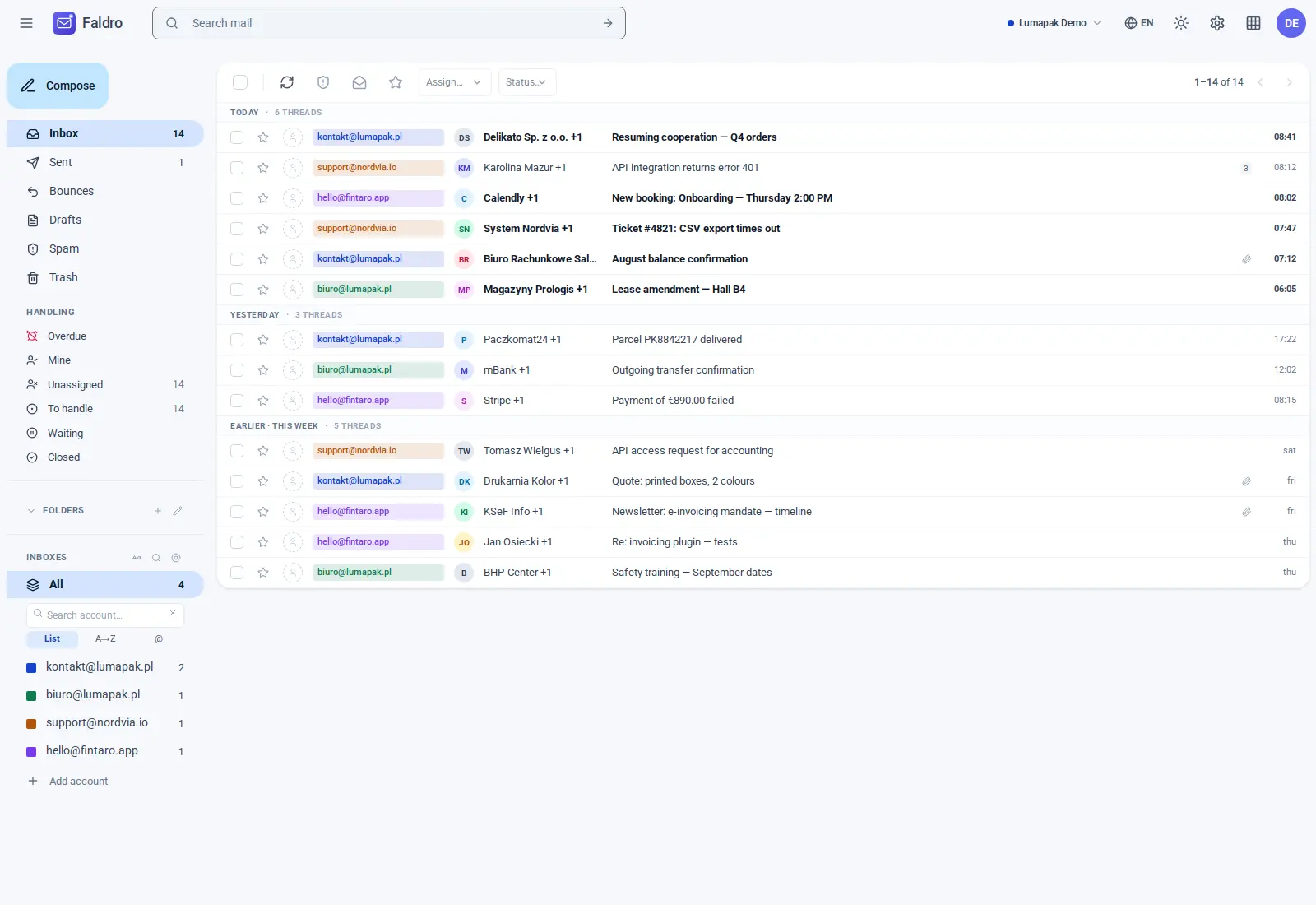
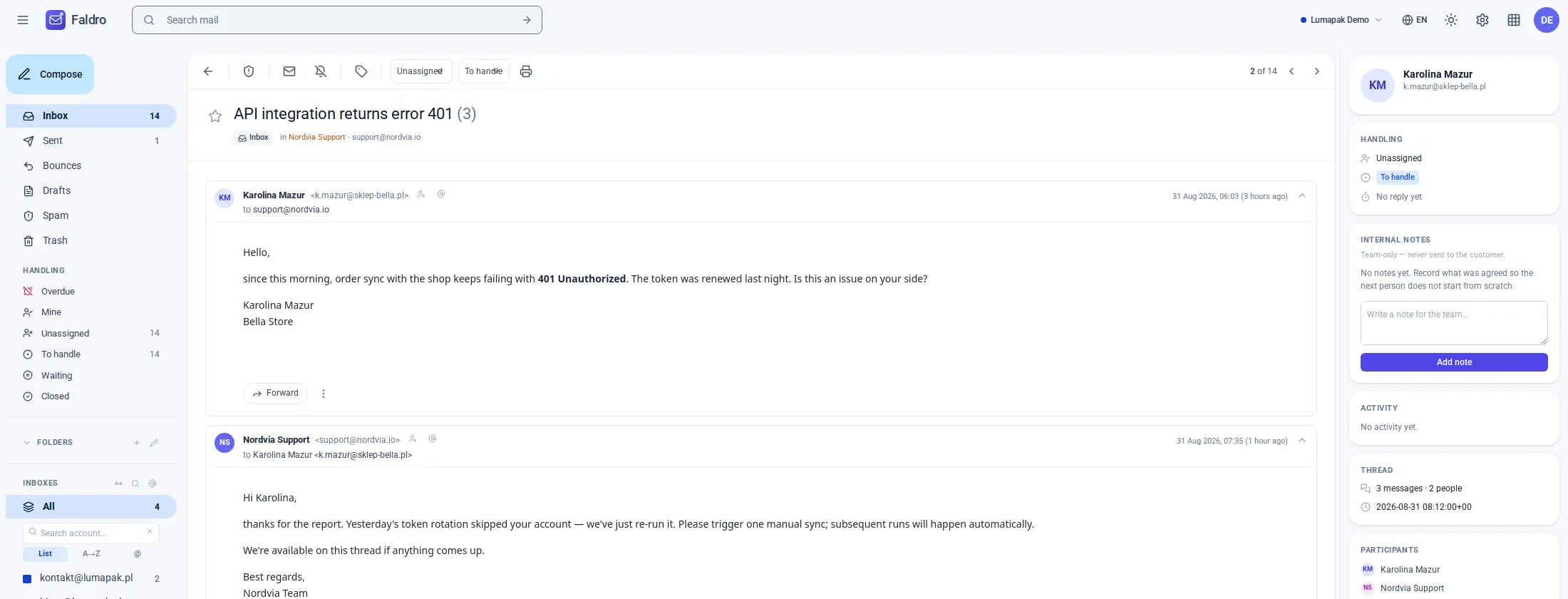
What Faldro does
Multiple sending identities per mailbox
You pick the sending address as you write; replies go out from the address the mail was sent to. This is the direct replacement for “Send as”.
One inbox for all accounts
All mailboxes come together in one list, colour-coded by account, and each stays available on its own.
Team access with permission levels
Each person has their own login and a permission level you assign: read-only, read and send, or full access — without shared passwords.
Search across all accounts
One search over sender, recipient, subject and body in every connected mailbox, narrowable by account, period, folder and messages with attachments.
Labels and folders
Folders sync with the provider over IMAP. Labels live in Faldro and work across account boundaries.
Mobile, installable as an app
The interface is built for the phone and can be added to the home screen as a PWA. No app-store listing needed.
Any number of domains
Any mailbox that offers IMAP and SMTP can be connected — regardless of where the domain is hosted.
Signatures per address
Each sending address has its own signatures — with separate defaults for new messages and replies.
06 — Migration
Migration in three steps
The migration is not automatic. You enter each address once by hand; the server settings are detected and shown to you for confirmation.
01
Enter the address
You enter the email address you have been using in Gmail under “Send as”.
02
Confirm the server settings
IMAP and SMTP settings for the common providers are already on file. You check them and correct them if needed.
03
Enter the password
The mailbox password, or an app password generated by the provider. Synchronisation then starts in the background.
07 — Security and data protection
Where your data is stored and who can access it
An email client needs access to your mailboxes. So this states in full which data is processed, where it is stored and how you get it back out.
Document
DPA to download
The data processing agreement under Art. 28 GDPR is available as a signature-ready PDF, without having to ask.
Download the DPA PDFRun it yourself
Faldro is also available as a self-hosted installation on your own infrastructure. The data then never leaves your network.
Self-hosting in detail08 — Pricing
Plans by number of mailboxes, unlimited users
You choose a plan by the number of connected mailboxes, storage and message count. How many people use them makes no difference to the price. All prices excluding VAT; tax is calculated at checkout. Payments are handled by Paddle as Merchant of Record, with a 14-day no-questions refund — refund policy.
Once the mailbox limit is reached no further mailbox can be added; when storage or message count is exceeded, fetching of new messages pauses until you change plan. Nothing is deleted and upgrades take effect immediately.
Agency
249 €
per month, excluding VAT
yearly 2,490 € · for agencies serving clients
Up to 20 client organisations and 200 mailboxes in total, 600 GB, 6,000,000 messages, API. Each client has a separate organisation and sees only their own. Your own brand: name, logo, colour and sign-in subdomain.
Trial
14 days
free, no payment details
The Team plan in full. After 14 days you pick a plan; without a subscription mail stays readable, but no mailboxes or people can be added.
Self-hosted
on request
over 100 mailboxes or your own infrastructure
Runs on your servers, updates and support as agreed. Billed outside Paddle, by contract and invoice.
What happens to the mail already in Gmail? +
They stay in your Google account and remain accessible; the change only affects the connection to third-party addresses. You can additionally connect your Gmail account to Faldro over IMAP and search the old messages alongside the rest, or export them with Google Takeout.
Can Google reverse the change? +
It is possible, but it has not been announced. We cannot influence it and we do not restore a feature Google removes. Faldro is a separate client with its own access to your mailboxes, independent of Google's decisions.
Why does Faldro need my mailbox password? +
At most providers IMAP and SMTP do not support OAuth; the login uses the mailbox name and password. Where your provider offers app passwords we recommend those, since you can revoke them individually. How the credentials are stored is described in the section Security.
Does my data leave the EU? +
Your messages and mailbox data — no. Operation, storage and backups take place within the EU; the subprocessors in use are listed above with their locations. Which servers your messages travel to beyond that is determined by your mailbox provider and your recipients.
What happens if I stop paying? +
Your messages are with your email provider, not with us — access to them remains either way. After payment ends the organisation moves to the expired plan: mail stays readable and keeps syncing, and export works with no time limit. What stops is adding mailboxes, addresses or people.
Is the migration done automatically? +
No. Every address is entered by hand. Server settings for the common providers are on file and offered for confirmation; you enter the addresses and passwords yourself. We do not read your Gmail settings.
Does Faldro improve my email deliverability? +
No. Sending goes through your provider's SMTP server, exactly as before. Deliverability depends on your provider, your DNS records and your sending behaviour. We promise nothing here.
Does Faldro work with Outlook.com, Yahoo, Fastmail or my own hosting? +
Yes, as long as the mailbox offers IMAP and SMTP. With some plans, external access must first be enabled in the provider's customer panel; the setup step points this out.
How many people may use one mailbox? +
Any number. The price depends on the plan you choose — the mailboxes, storage and messages it covers — not on how many people sign in. Each person signs in with their own credentials and gets only the permission level you grant: read-only, read and send, or full access.
Is there an app for iOS and Android? +
Faldro runs in the phone's browser and can be added to the home screen as a PWA. There are no separate apps in the app stores.
Do I get a data processing agreement? +
Yes. The DPA under Art. 28 GDPR is available as a PDF download and can be signed electronically. No need to contact sales.
Can I run Faldro on my own servers? +
Yes. There is a self-hosted edition for running in your own environment. Credentials and messages then stay entirely with you.
In January 2027, “Send as” for third-party addresses ends. The next step is one mailbox.
14 days free with the full feature set. No payment details required.